 Yatri Studio
Models
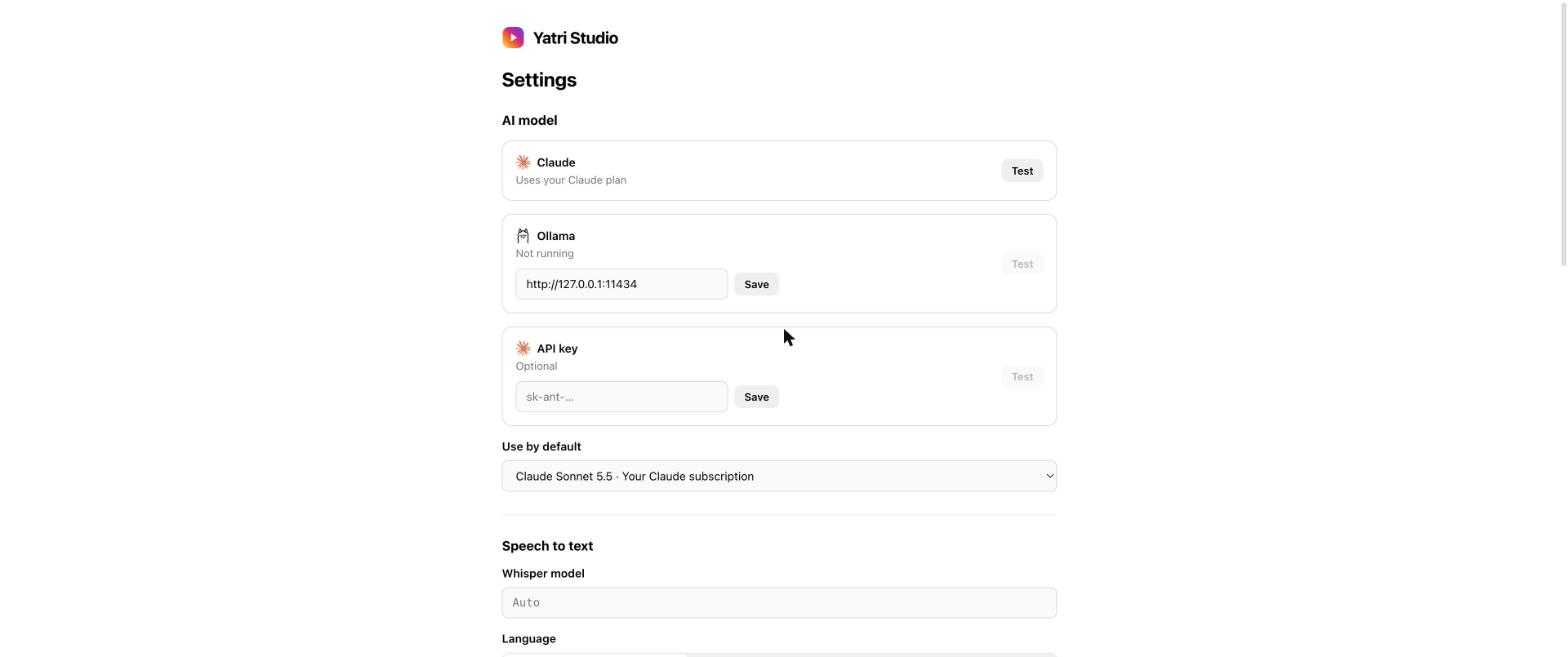
Use your Claude plan, an Anthropic API key, or a free local model with Ollama.
The model reads your request and decides which tool to run. It also orders clips in Smart Edit, picks moments in Make Shorts, writes post captions and humanizes text. The actual video work (cutting, beats, captions, rendering) happens on your Mac with ffmpeg and whisper.cpp, whatever model you choose.
Your Claude plan (recommended)
If you pay for Claude Pro or Max, Yatri Studio can use it through Claude Code, which is already signed in to your account.
- Install Claude Code:
npm i -g @anthropic-ai/claude-code - Run
claudeonce in Terminal and sign in. - In Yatri Studio, open Settings and click Test next to Claude. You should see "Connected".
Pick Sonnet for everyday edits. It is fast and good at planning. Opus is slower but better at Smart Edit and Make Shorts on long, messy footage. Haiku is the quickest for simple requests.
Ollama (free, fully offline)
Install Ollama from ollama.com.
Start it and download a model:
ollama serve
ollama pull llama3.1
Open the model menu next to the send button. Your Ollama models appear under Ollama.
Smaller local models sometimes pick the wrong tool. If that happens, choose the tool yourself from the sidebar or with /.
Anthropic API key
Use this if you prefer to pay per request. Paste your key in Settings › API key and click Save. The key stays in .studio/settings.json on your Mac and is never shown again in the app.
Save credits
Settings › AI model › Save credits is on by default. Quick jobs (picking the tool for your request, writing plan suggestions, converting Hindi captions to Roman letters) go to Haiku, the fastest and cheapest Claude model. Jobs where quality matters most (ordering clips in Smart Edit, choosing moments in Make Shorts, writing and humanizing captions) use the model you picked.
All video work (cutting, beats, crop, colour, captions, rendering) runs on your Mac and never uses credits.
Speech engine
Settings › Speech to text › Engine picks who turns speech into words:
| Engine | Notes |
|---|---|
| Auto (default) | Uses Azure Speech when its key is set, otherwise this Mac |
| This Mac | whisper.cpp, offline and free. Good for English, fine for Hindi |
| Azure | Usually more accurate for Hindi and Hinglish. Sends the audio to Azure and is billed per hour of audio |
To use Azure, add AZURE_SPEECH_KEY and AZURE_SPEECH_REGION to .env.local in the project folder, then restart the studio. If Azure fails, Auto falls back to this Mac.
Song names from Instagram
Instagram only tells logged-in visitors which song a reel uses. Open Settings › Instagram and pick the browser where you're logged in (Chrome, Safari, Brave, Edge or Firefox). Reel Recreate will then name templates after the real song and artist. Your login is read on this Mac and only sent to Instagram. macOS may ask once to allow access.
When no model answers
The editor still works. If the model is offline, it matches your words to a tool ("captions" opens Auto Captions, a reel link opens Reel Recreate) and shows a small note: "Model offline. Picked a tool from your words." Tools that need a model to think, like Make Shorts, will tell you to pick another model.