 Yatri Studio
Export to your editor
Open any edit in Premiere Pro, DaVinci Resolve, Final Cut Pro or CapCut and keep working.
Every edit comes with timelines for the big editing apps. They point to your original clips with the exact in and out points, so you can trim, re-time or regrade without any quality loss.
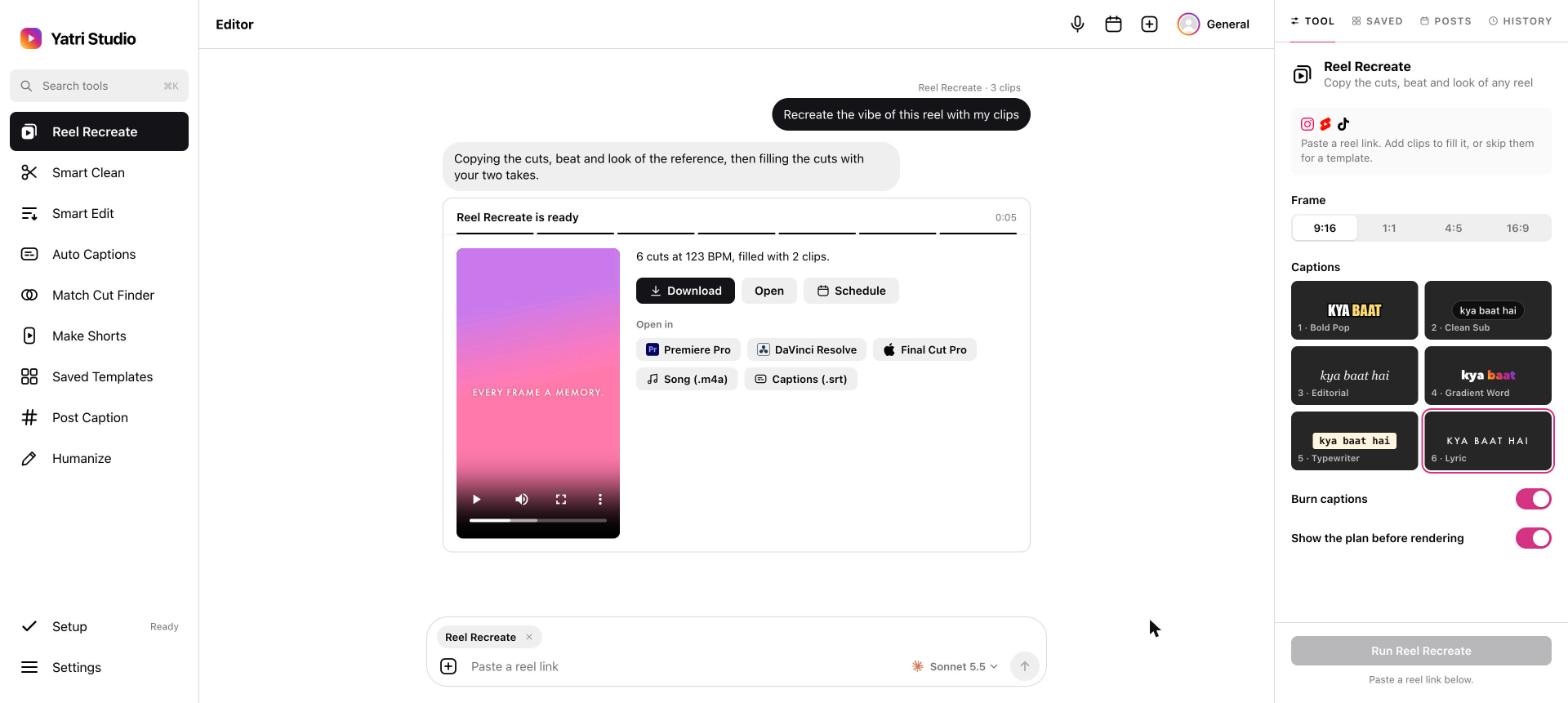
What each button gives you
| Button | File | Open it with |
|---|---|---|
| Premiere Pro | timeline.premiere.xml |
Premiere Pro › File › Import |
| DaVinci Resolve | timeline.resolve.fcpxml |
Resolve › File › Import › Timeline |
| Final Cut Pro | timeline.fcpxml |
Final Cut Pro › File › Import › XML |
| Song (.m4a) | song.m4a |
Any editor, CapCut, your phone |
| Captions (.srt) | captions.srt |
CapCut, Premiere, Resolve, YouTube |
Whole project (.zip)
Reel Recreate, Saved Templates and Split Shots also give you Whole project (.zip): one download with everything an editor needs.
project/
  footage/        every clip used, in timeline order
  audio/song.m4a  the soundtrack
  captions.srt    when there are captions
  *.premiere.xml  for Premiere Pro
  *.fcpxml        for DaVinci Resolve and Final Cut Pro
  README.txt      how to open it
On your Mac the timelines open straight away. On another computer, unzip it and import the timeline. If the editor asks where a clip is, point it to the footage folder once and it finds the rest. For Split Shots, the project rebuilds the original edit from the clean footage.
You'll also find it in History, under ⋯ › Whole project (.zip).
Premiere Pro
- Click Premiere Pro (or download Whole project (.zip) and unzip it).
- Open Premiere Pro and create or open a project.
- Choose File › Import (Cmd + I) and pick the
.premiere.xmlfile. - A new sequence appears in your project with the same name as the edit. Double-click it.
- If Premiere asks where a clip is, point it to the
.studio/uploadsfolder inside the project.
Reel Recreate timelines also include the song on its own audio track and a marker on every cut and beat. Press Shift + M to jump between them.
After Effects can't open these files directly. Import into Premiere first, then send the sequence to After Effects with Replace with After Effects Composition.
DaVinci Resolve
- Click DaVinci Resolve.
- In Resolve, choose File › Import › Timeline and pick the
.fcpxmlfile. - Leave "Automatically import source clips into media pool" checked.
Final Cut Pro
- Click Final Cut Pro.
- In Final Cut, choose File › Import › XML.
CapCut
CapCut doesn't import timelines from other apps. Use the pieces instead:
- Download the video, the Song and the Captions (.srt).
- In CapCut, import the video, add the song as audio, and import the SRT under Text › Auto captions › Import. Menu names change between CapCut versions.