 Yatri Studio
Match Cut Finder
Find shots that flow into each other, so your transitions feel planned.
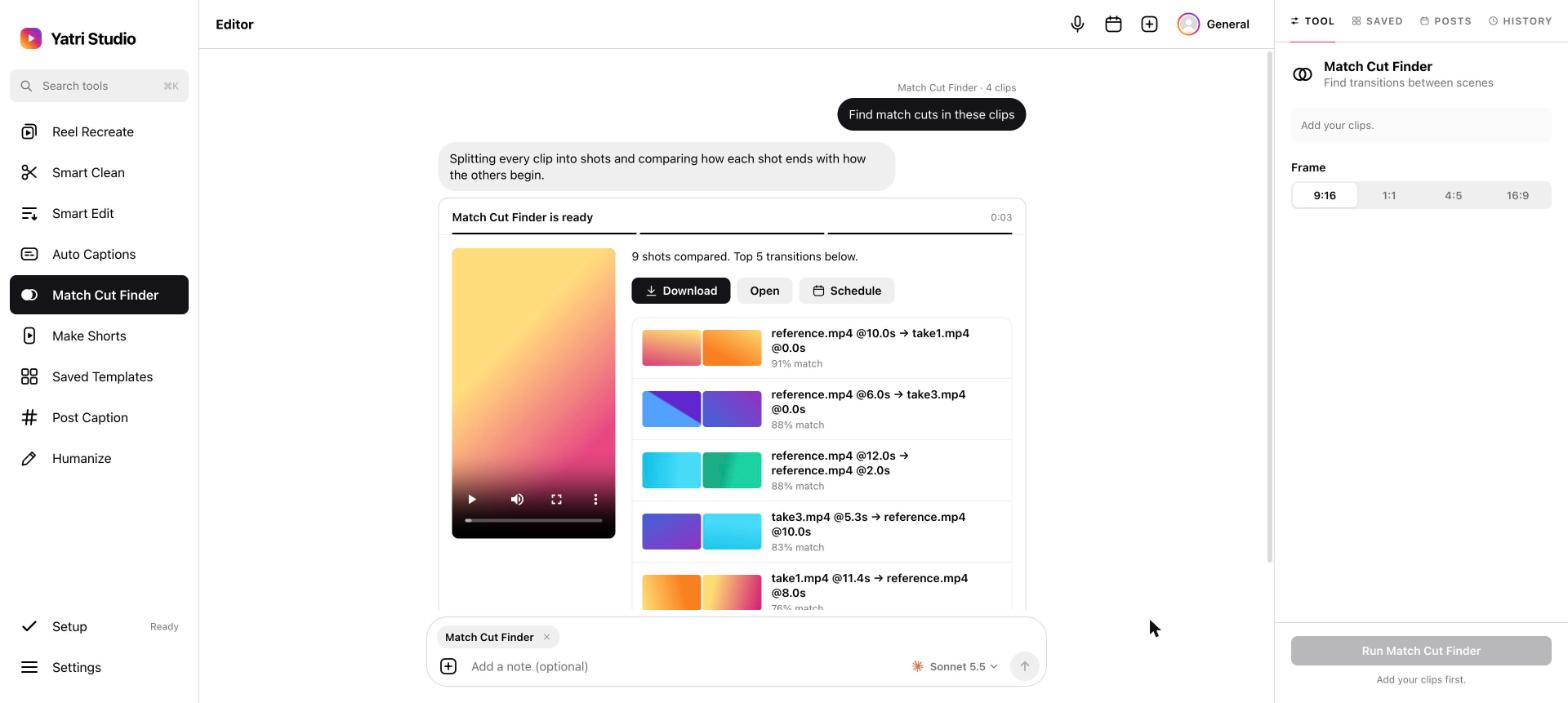
A match cut joins two shots that look alike at the moment of the cut: same shape, same position, same colour. Viewers barely notice the cut, and the edit feels smooth. Match Cut Finder splits all your clips into shots and compares the last frame of every shot with the first frame of every other one.
Try it
- Add clips that contain different scenes. More shots give more options.
- Type
/matchcut. - Press Run.
What you get
- A list of the best pairs, strongest first. Each shows both frames side by side, the file names, the exact times, and a match score.
- A preview video that plays the top pairs back to back, so you can judge them in motion.
On a real reel
Run on a single 9.4-second reel with 23 shots, it paired each wave shot's ending with a later shot that starts in a similar way. Scores are lower here (around 56%) because waves change shape fast. Clips with steady shapes, like faces, doorways or products, score much higher.
Footage: @nishthamenariaaa, used with permission.
The score combines layout (where the bright and dark areas are) and colour. Above 85% usually cuts very smoothly.
Get the best result
- Shoot with match cuts in mind. End one shot on a circle (a cup, a clock, an eye) and start the next on another circle in the same spot.
- Hand movements across the frame make great match cuts. Swipe out of one shot, swipe into the next.
- Use the times shown to place the cut in your editor. The preview is for checking, not for posting.